
Picture a data-center pod beside Stockholm's district-heating network. Its servers reject heat continuously. A heat pump can lift that heat to a useful temperature, while an accumulator can shift delivery in time. In Post 1, we built this plant in Modelica and tested it against a Stockholm weather year.
A model can answer a design question. How does it become something an operator can actually use?
A digital twin needs more than a simulation and a dashboard. Measurements from the physical plant must reach the model, and the model's predictions or approved commands must return through a controlled data path. Calibration must also keep both sides aligned as the plant changes. Without that connection, the model remains a simulation tool rather than a digital twin.
We use the same plant model here. Exported as StockholmPod.fmu, it
becomes the physics core of an operating loop. Before building the software, it
helps to see the wiring that would place this FMU inside a real digital twin.
Wiring a Real Twin
Connecting a model to an operating plant takes several distinct hops.
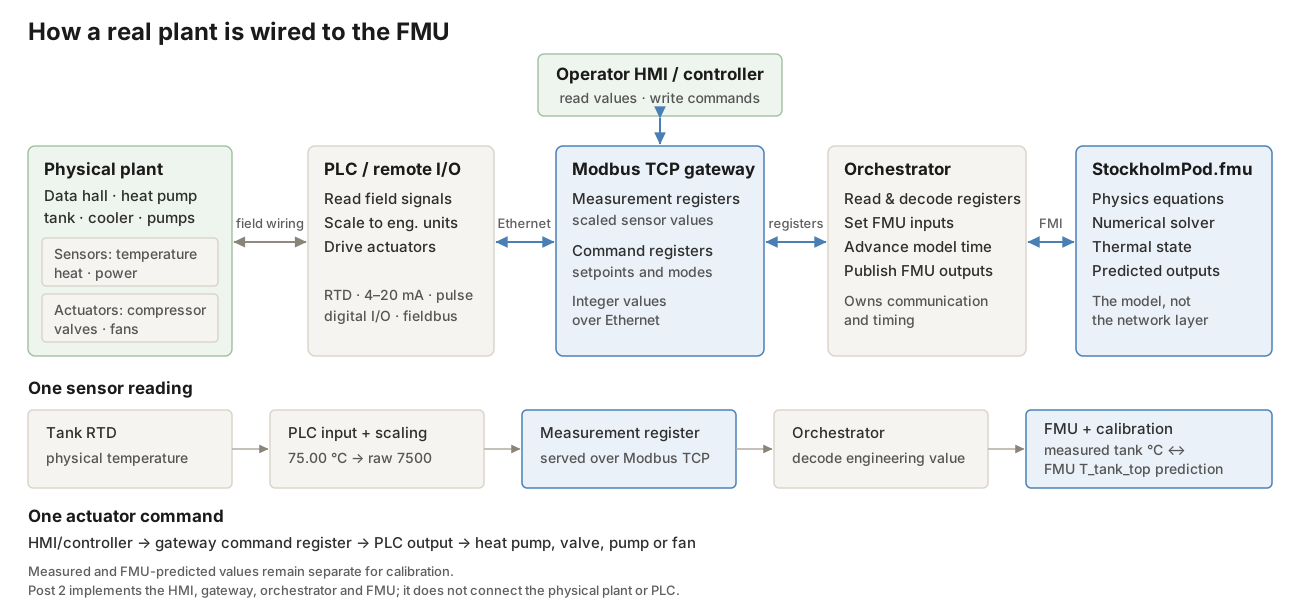
A physical sensor produces an electrical or digital field signal, such as a resistance or a 4–20 mA current loop. A PLC or remote-I/O module reads that signal, scales it into an engineering value, and maps the value to a register. The Modbus TCP gateway exposes those registers over the network. The orchestrator then decodes them for the FMU and writes approved commands back through the same chain.
Measured and predicted signals remain separate. Comparing them is how an operational twin detects drift and calibrates uncertain model parameters.
This post builds the software side of that architecture: the console, gateway, orchestrator, and the FMU exported from the Post 1 model. It does not connect a physical plant or PLC. The result is an operating simulation prototype and the software skeleton for a future digital twin. The Digital Twin Consortium reserves the full term for a model synchronized with a real-world entity.
Closing the Loop
How does a browser command reach a Modelica model?
The console and orchestrator never call each other directly. They communicate through a Modbus TCP gateway whose register map acts as their shared contract. The console writes setpoints. On its next tick, the orchestrator reads those setpoints, advances the FMU, and publishes the resulting values back to the gateway. The console then picks them up on its own polling clock.
The protocol is real Modbus TCP. TCP changes the transport, while the familiar Modbus register and function-code model remains. The Modbus Organization documents the protocol in detail.
The operator-facing slice of the map is small:
| Register | Signal | Access | Meaning |
|---|---|---|---|
| 40002 | Q_sold |
RW* | Heat delivered to the network, kW |
| 40007 | P_grid |
RW* | Grid import, kW |
| 40008 | T_tank_top |
RW* | Accumulator temperature, °C |
| 40012 | COP_hp |
RW* | Current heat-pump COP |
| 40014 | T_amb |
RW* | Outdoor dry-bulb temperature, °C |
| 40101 | u_prod |
W | Delivery product |
| 40102 | Q_hp_set |
W | Heat-pump thermal output, kW |
| 40103 | y_dry |
W | Dry-cooler capacity, 0–1 |
| 40104 | y_chg |
W | Tank command, -1–1 |
Each register sits on one piece of equipment inside the plant: four orange controls that the operator adjusts, and five green readings that the model reports back.
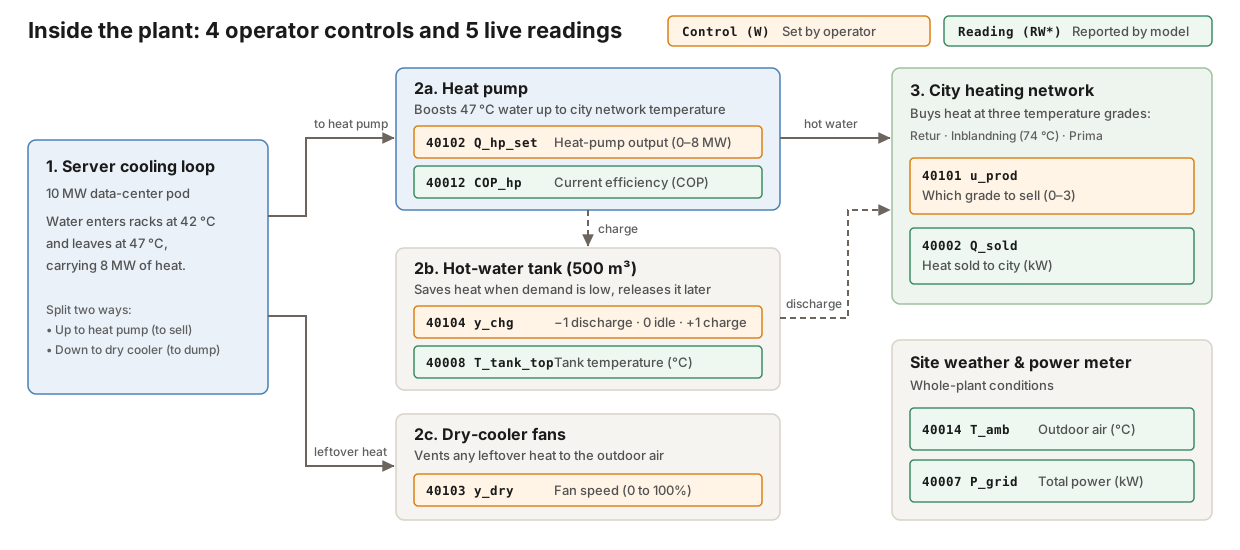
The asterisk matters. The prototype uses one holding-register space, so the readings are writable at the protocol level. Calling them readings is an interface convention, not an access-control guarantee.
The gateway still enforces physical bounds on the command block, clamping every
incoming write to its allowed range and logging whether it was clamped. It also
initializes two command registers away from zero: y_chg starts at raw 500
(idle) and y_dry starts at raw 1000 (full fan capacity), so a freshly
started stack neither drains the tank nor forces mechanical cooling before an
operator touches a control.
flowchart TD
    Step1["1. Web console writes controls (40101–40104)"]
    Step2["2. Modbus gateway clamps limits and stores controls"]
    Step3["3. Orchestrator reads controls and steps StockholmPod.fmu (30 s)"]
    Step4["4. Orchestrator publishes new readings (40002–40014) to gateway"]
    Step5["5. Web console polls gateway (1 s) and updates dashboard"]

    Step1 --> Step2 --> Step3 --> Step4 --> Step5
Following One Tick
When does a changed setpoint affect the model?
The orchestrator advances the plant by 30 simulated seconds per tick. Docker runs the model at six times real speed, so a tick occurs about every five wall-clock seconds. The console polls once per second. A command can therefore wait in the gateway for almost one plant cycle before the FMU sees it.
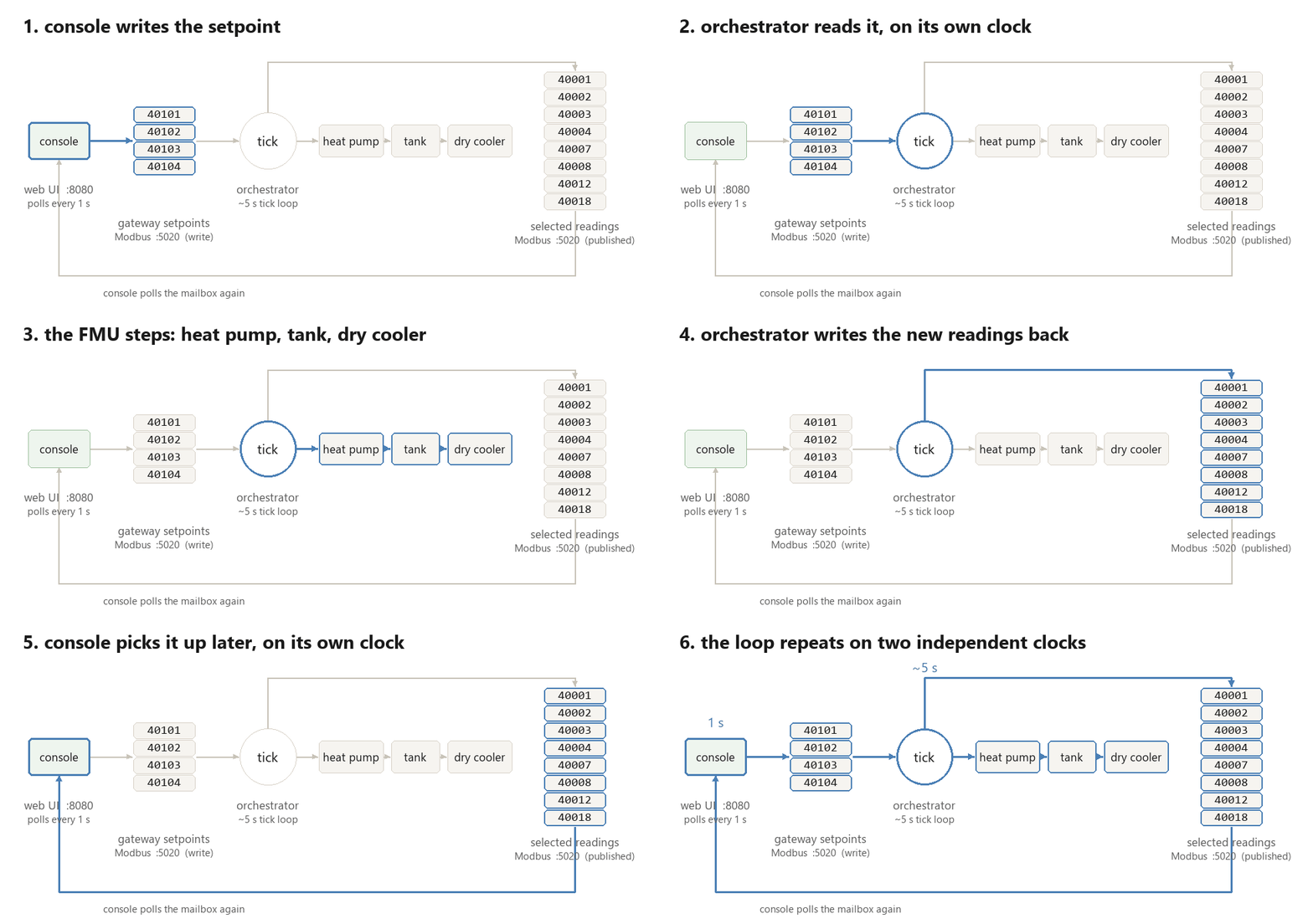
The core of that loop remains deliberately small:
setpoints = {}
for name, (addr, scale) in WRITE_REGISTERS.items():
    raw = io.read_holding_registers(addr, 1)[0]
    setpoints[name] = raw / scale
setpoints["y_chg"] = setpoints["y_chg"] / 500.0 - 1.0

p_it, t_amb = generate_disturbance(t_sim_s)
t_net_sup, t_net_ret = network_temperatures(t_amb)
inputs = PlantInputs(
    P_it=p_it,
    T_amb=t_amb,
    T_net_sup=t_net_sup,
    T_net_ret=t_net_ret,
    Q_dem=network_heat_demand(t_amb),
    **setpoints,
)

outputs = plant.do_step(dt_s, inputs)
Modbus holding registers are unsigned 16-bit integers. Temperatures use a scale
of 100, whereas power stays at 1 kW resolution to fit inside 65,535. The tank
command avoids signed registers through an offset encoding: the engineering
range from -1 to 1 travels as 0 to 1000 and returns through raw / 500 - 1.
Sub-zero outdoor temperatures on T_amb use 16-bit two's complement on the
wire instead.
Until live or historical feeds arrive in Post 3, generate_disturbance drives
the plant with two deterministic 24-hour sine waves: a 10 MW IT load with a
±0.4 MW ripple and an outdoor temperature of 7 ± 6 °C. From that outdoor
temperature, network_temperatures and network_heat_demand evaluate the same
Energiforsk 2024:1059 supply/return curves and degree-day demand curve defined
in Post 1.
Stepping the FMU
Each orchestrator tick advances the compiled Modelica plant by one 30-second
communication step. FMUPlantModel loads the same StockholmPod.fmu used for
the annual study, sets the FMI inputs, calls fmi2DoStep, and reads the
outputs.
The FMU retains thermal state across ticks. Each call resumes from the previous tank temperature, which is what turns a sequence of operator commands into a continuous physical trajectory.
That state currently lives only inside the orchestrator process. Restarting it creates a new FMU instance and resets the tank to 47 °C. A physical tank would remain hot, so an operational twin would need checkpoint recovery or state estimation from measurements.
Reading the Response
Operating the loop exposes physical interactions that a wire-level connection test cannot see.
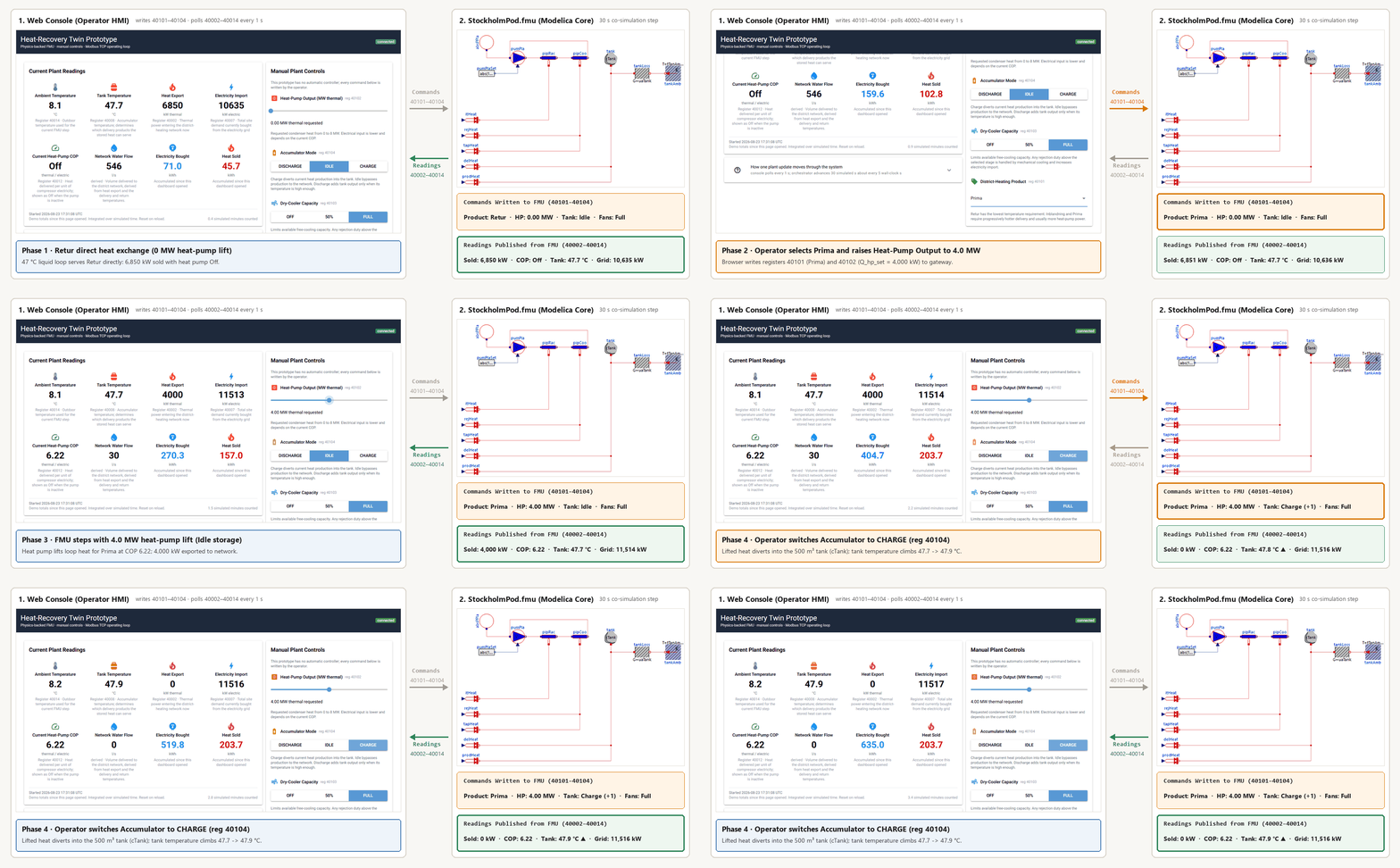
Because the live disturbance wave starts at 7 °C and spans 1 to 13 °C, mild weather is what the browser console shows out of the box. Select Retur, and the 47 °C liquid loop is already warm enough to serve the return-line product through direct heat exchange. Heat export appears while the heat-pump command remains at 0 MW and the COP display reads Off. The cheapest path needs no compressor lift.
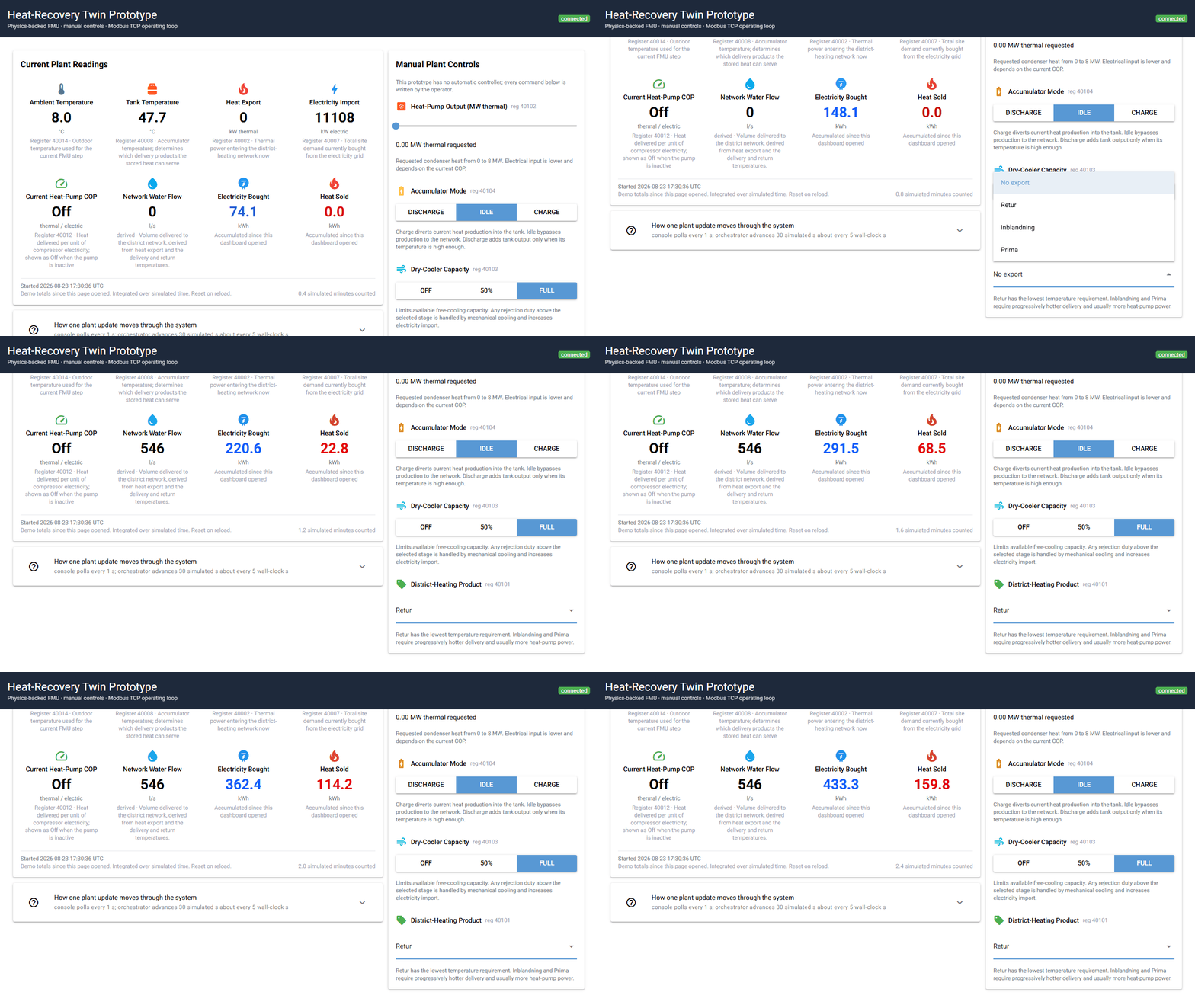
Deep-winter cases outside that 1 to 13 °C live wave are pinned in the pytest
suite, which drives FMUPlantModel directly. At -20 °C, the network return
rises to 59 °C, above the liquid-loop temperature. With no heat-pump duty
commanded, Retur delivers nothing.
Higher-temperature products expose the electrical cost of lift. In the -10 °C pytest scenario, a 3 MW thermal command gives Inblandning a COP of 6.43 and a compressor draw of 466.7 kW. Prima asks for 92.5 °C under the same conditions. Its COP falls to 4.02 and compressor power rises to 746.6 kW. The thermal setpoint has not changed. The required temperature has.
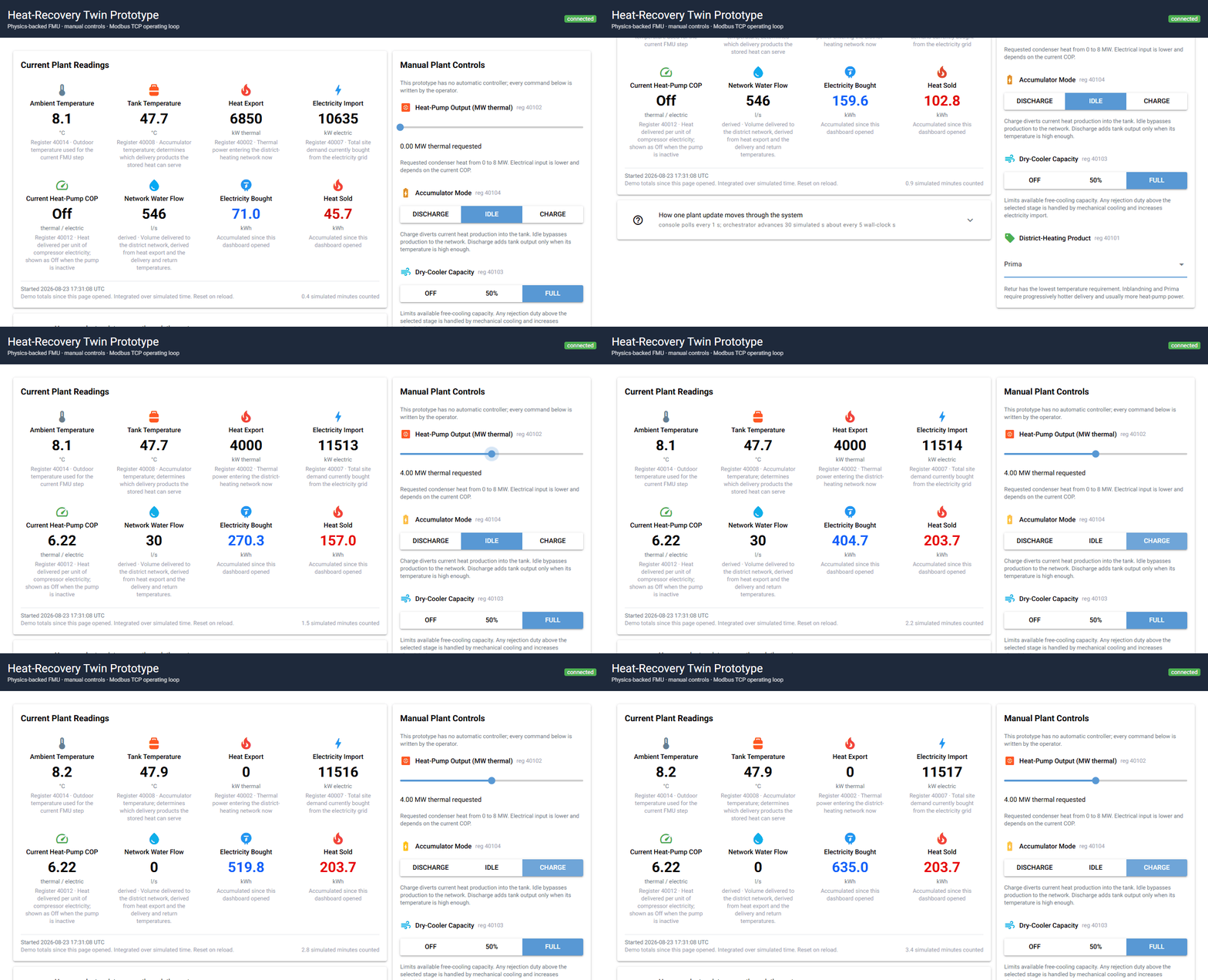
Storage adds time to the problem. A tank starting at 47 °C cannot directly serve a high-temperature product, and the 500 m³ water volume warms slowly. Back in the live GUI's mild-weather default, selecting Prima and commanding heat-pump output shows the current COP immediately. Switching the accumulator to Charge then diverts production into the tank, so the tank temperature climbs gradually over successive ticks.
We built the loop against 47 pytest checks covering the FMU physics, register contract, gateway clamping, console I/O, tick loop, and a real TCP round trip. The integration test reads through to the final register in the contract, so a truncated datastore fails loudly. The standalone Post 2 release ships the runnable stack, while the full test suite runs in GitHub Actions whenever the model or wire contract changes.
Running the Prototype
Docker runs the gateway, orchestrator, and web console together with no local Modelica or C toolchain required:
docker compose up --build
Open http://localhost:8080. One overview card places the current plant
readings beside the energy accumulated since the dashboard opened. It reports
ambient and tank temperatures, heat export, electricity import, current COP,
and the water flow sold to the network, derived from the heat export and the
delivery and return temperatures.
Electricity Bought and Heat Sold integrate from the first valid reading
using simulated time. Their UTC start timestamp appears below the values, and
both totals reset when the page reloads.
The heat-pump slider spans 0 to 8.0 MW thermal. Accumulator mode uses
Discharge / Idle / Charge, while dry-cooler capacity uses Off / 50% /
Full. Run docker compose down when finished.
Drawing the Boundary
Six deliberate limits separate this prototype from a deployed plant system:
- The FMU runs against synthetic IT load and weather traces.
- Every command comes from a human. There is no automatic controller.
- FMU state disappears when the orchestrator restarts.
- Registers retain only the latest values. The dashboard's energy totals are session-only and reset on reload.
- Reading registers remain writable in this local Modbus design.
- The model puts no connection-capacity limit on combined bypass and tank discharge, so commanding discharge on top of direct loop delivery sells both streams at once.
That list is the boundary between a useful prototype and an operational twin. The model can now be operated. It cannot yet observe and reconcile itself with a physical plant.